
Satellite crop monitoring for every field you grow.
Eleven vegetation indices, computed weekly on every field you subscribe. Plain-language insights and 3 years of history land on day one.
Every 5-7 days
Weekly Sentinel-2 updates
~10m resolution. Every 5 to 7 clear days.
11 vegetation indices
All eleven, every clear date.
3 years of history
Backfilled automatically on day one.
Interactive dashboard
Heatmaps, histograms, trends, year-over-year.
Plain-language Insights
Generated in your account language.
Data exports
CSV and shapefile. Any date, any index.
How the indices help, stage by stage
Different indices answer different questions, and which question matters depends on where the crop is in the season. Here’s what to look at when, and what each index actually tells you.
Establishment
Crop is just emerging. Canopy is partial, soil is still visible underneath, and standard NDVI reads the soil more than the plants.
- MSAVI adjusts for visible soil so you get a real read on early canopy.
- OSAVI flags uneven or slow emergence across the field.
Soil chemistry shapes how this stage goes. If you have Soil Analysis subscribed, Insights cross-references both layers automatically.
Vegetative growth
Canopy is closing. The crop is building biomass and pulling nutrients hard.
- NDVI tracks general vigor and field-wide density.
- NDRE picks up nitrogen and chlorophyll shifts before they show in greenness.
- GNDVI confirms chlorophyll changes and nitrogen uptake.
Reproductive / peak canopy
Crop is at peak biomass. NDVI saturates here, and water stress can do real damage fast.
- EVI keeps separating good from very good when NDVI flatlines.
- NDMI measures canopy moisture, the early water-stress signal.
- MSI confirms stress severity. Read NDMI and MSI together.
Maturation and senescence
Crop is winding down toward harvest. The question shifts from “is it healthy” to “is it on schedule.”
- NDVI decline shows the senescence curve.
- Year-over-year overlay shows whether the curve is early, late, or on track vs the same stage last year.
→
Each phase unlocks new insights. You can track the timeline, switch indices, and read the Insight generated at any given time.
Understand your crops
In-season management
Catch stress before it shows
Cross-check NDRE, NDMI, and MSI to separate nitrogen, water, and general stress. Decide where to scout this week.
Treatment validation
See whether what you did worked
Run an irrigation or fertilizer event, then watch the next two or three acquisitions. The trend chart turns “I think it helped” into a measurable response.
Season-over-season planning
Build a record you can plan against
Compare this season’s curve to the same period last year. Useful for benchmarking, sustainability reporting, and next-season decisions.
11 indices, picked by the question you’re asking
Different indices respond to different things. The value of having all of them is that you can ask sharper questions and get better answers.
“What’s the headline number for this date?”
EVI
Quick read across the field. NDVI is the anchor; EVI helps when canopy is dense.
“Is nitrogen off before it shows in greenness?”
GNDVI
Chlorophyll-sensitive. Catch deficiency 1 to 2 weeks earlier than NDVI.
“Is the canopy under water stress?”
MSI
NDMI for moisture content, MSI for stress severity. Read together.
“Is the crop establishing evenly?”
OSAVI
Soil-adjusted. Reliable when canopy is patchy and soil is showing.
“Where should I scout this week?”
NDRE
Anomaly hunting: zones that diverge from the field mean or from last pass.
“Where do I split my nitrogen this season?”
GNDVI
In-season zoning for variable rate. The actual decision NDRE was made for.
“Is salinity building up in problem zones?”
BSI
Salt accumulation flags, especially on irrigated or coastal fields.
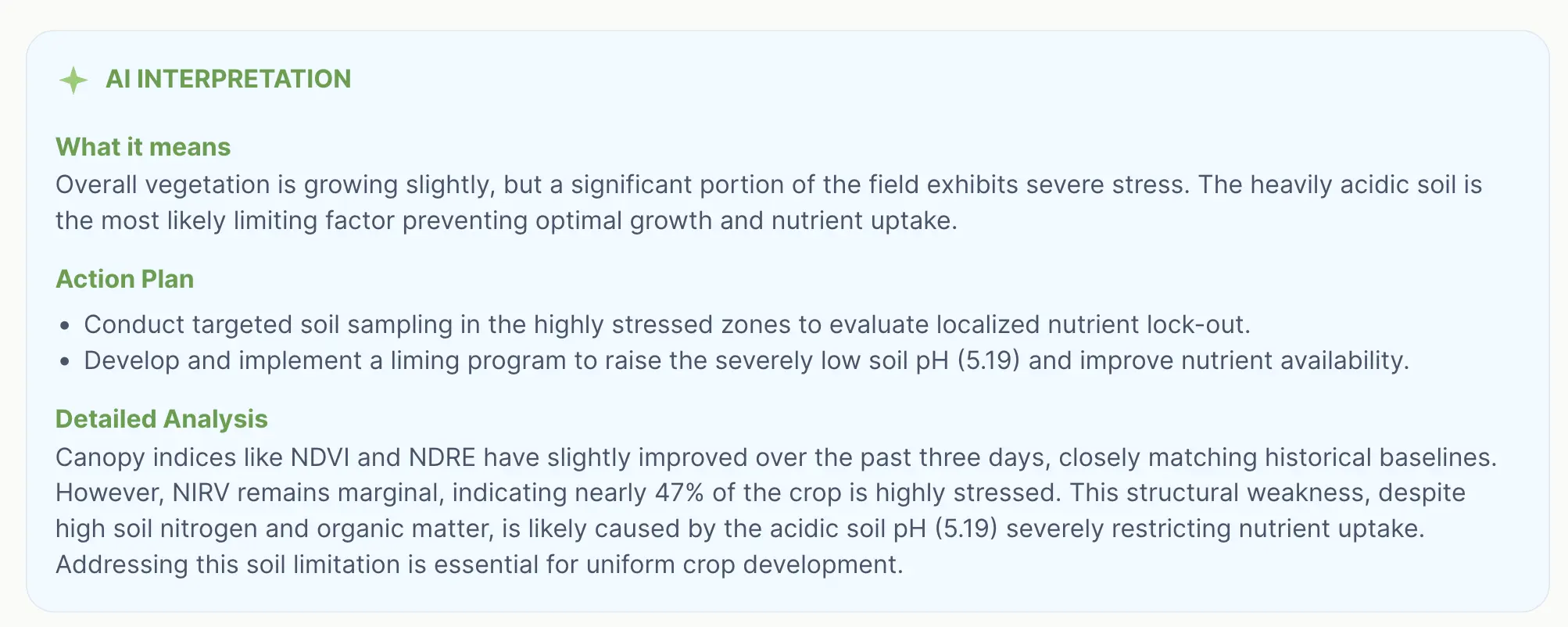
Siora Insight
Every clear-sky acquisition gets an Insight in your account language. Three parts:
- What it means. What the field is doing right now, in one paragraph.
- Action plan. One to three concrete next steps. “Scout the southern third this week.” Not advice, instructions.
- Detailed analysis. Which indices moved and how, against the previous date and the same period last year. Soil data when you have it.
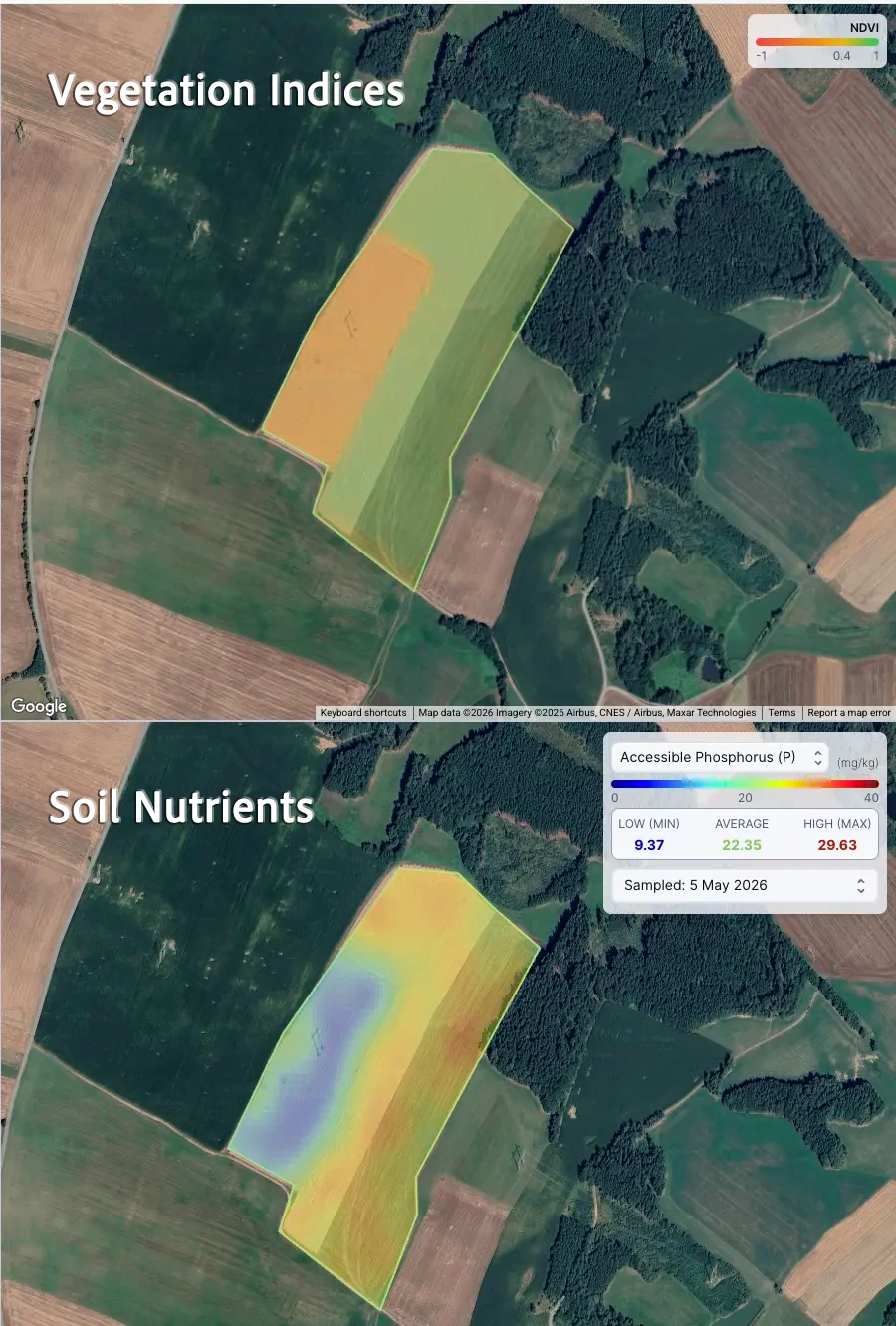
See vegetation and soil side by side
Vegetation tells you how the crop is performing. Soil tells you why.
With Siora’s split view, you can put any vegetation index next to any
soil property on the same field, on the same screen.
A few examples of what this unlocks:
-
✓
NDRE next to Nitrogen. See whether the field’s chlorophyll patterns line up with measured nitrogen variability, or point to something else. -
✓
NDMI next to Soil Organic Matter. Check whether dry zones in the canopy match low-SOM areas where water-holding capacity is limited. -
✓
MSAVI next to pH. Spot whether weak early establishment correlates with pH-stressed zones.
If a field doesn’t have a soil analysis yet, you can order one directly from the split view.
and at least one Siora soil analysis.
Learn about soil analysis →
How a subscription works
1. Subscribe a field
Draw the boundary or upload a shapefile on app.siora.ai. Yearly billing per hectare.
2. Activation, day one
Siora pulls up to 3 years of clear-sky imagery and runs all 11 indices on every usable date.
3. Dashboard opens
The latest acquisition lands first with its Insight. Earlier dates fill in behind it.
4. Weekly updates
New acquisitions process automatically. No action needed.
What’s in the dashboard
All 11 indices on every clear date. Health classification and distribution histograms. Trend charts at 1 month, 3 months, 1 year, full history. Year-over-year overlay. Siora Insights on the latest date. CSV and shapefile export.
See real monitoring on a real field.
A full season of acquisitions, 11 indices, and Insights. No sign-up required.